

Navigating the Evolution: Your Journey to VMware Cloud Foundation (VCF) 9
VMware Cloud Foundation (VCF) 9 has been available for six months now. As initial dependency blocks clear and more customers initiate strategic discussions around the platform, we have noticed several common misconceptions regarding the upgrade path. In this blog post, we explore the core of VCF 9 and outline the journey toward a successful implementation.
What is VCF 9?
VCF 9 represents the evolution of the VCF platform that VMware has had for years now. Shifting toward a fundamentally different approach: it is a comprehensive, all-in-one solution. Rather than a collection of disjointed products, VCF 9 integrates key components into a single Secure Private Cloud Platform.
VCF 9 consists of the following core pillars:
vSphere
NSX
VCF Operations
VCF Automation
vSAN
VCF Installer
This integration enables customers to elevate their existing vSphere VM-centric solution to a truly modern application platform capable of running VMs, containers and AI workloads seamlessly.
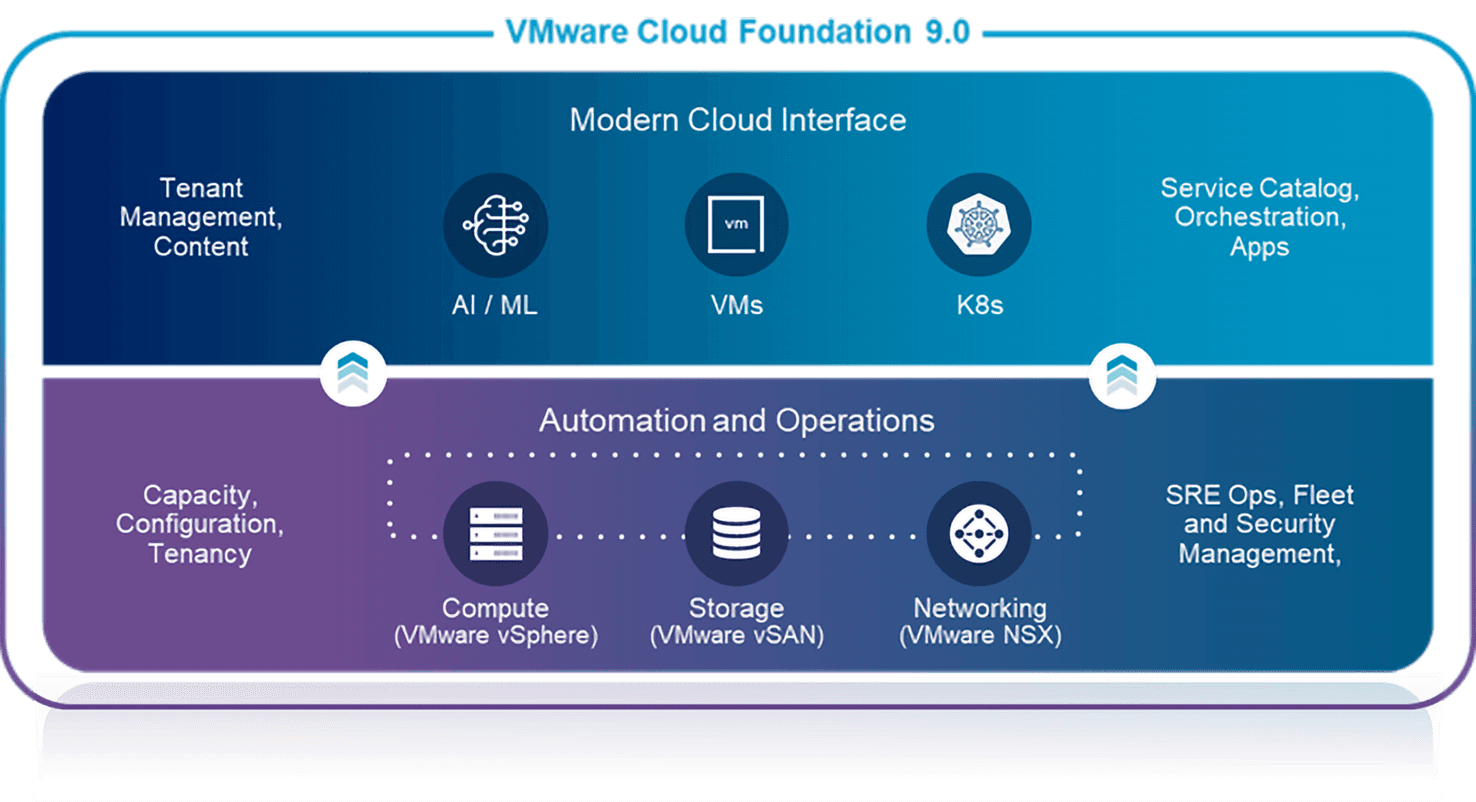
Beyond the core VCF platform, VMware also offers a portfolio of advanced services to cover key use cases like disaster recovery, ransomware protection, advanced security (including cybersecurity measures for malware and ransomware), load balancing, application services, data services (such as database-as-a-service).
Upgrade paths to VCF 9
So, with the core platform explained, the biggest questions we get is “how do we upgrade?”. Based on your current environment and future requirements, we have three primary paths:
Deploy New VCF 9 Environment: Deploying a fully customized environment from scratch that's tailored to your needs and importing existing workloads.
Upgrade vSphere Environment to VCF 9: The focus of our blog, transitioning a traditional vSphere environment into the VCF stack. We'll highlight all requirements and possible upgrade paths.
Upgrade existing VCF Environment to VCF 9: An in-place upgrade for existing VCF users.
Navigating the transition: What You Need to Know
"Do I need the full stack just to use vSphere 9?"
Not immediately. It's not necessary to fully deploy the entire VCF suite to continue with vSphere 9. The only required component, at the time of writing, is VCF Operations. This is the centralized management component that's also in charge of license distribution. Before the actual upgrade we'll start with a workshop to present the full VCF 9 platform and discuss all components.
"I have VCF licenses, do I need to implement everything at once?"
No. Many customers have bought a multiyear VCF contract with yearly payment but this does not mean a full VCF stack needs to be implemented (see the question above). In reality we assist customers with their upgrade to v8 and build a roadmap afterwards to work towards version 9 by October 2027 when v8 goes EOL.
"Is NSX mandatory?"
VCF 9 utilizes NSX as a core part for the networking of the entire solution. Of course, customers can deploy VCF 9 with a mandatory single / standalone NSX manager without ever utilizing the NSX capabilities. This is perfectly supported and feasible. In our roadmap we'll recommend customers to also adopt NSX networking to be able to utilize VKS, VPCs and NVIDIA Private AI.
"Do I need vSAN? Is 3-Tier storage supported?"
Yes, 3-tier solutions (based on NFS or FC) are also qualified as primary and supplementary storage. This means that the VCF management domain can use 3-tier storage without any issues.
We should highlight that not only vSAN offers a better TCO but is also a key component to truly build a flexible, scalable, secure Private Cloud platform.
Current limitations
As of early 2026, a few specific limitations exist, though most are expected to be addressed in VCF 9.1 (target Q2 2026):
Dell VxRail: Currently requires a RPQ to upgrade to VCF 9.
vCloud Director: No direct upgrade path yet. There is a migration path to VCF Automation but there is no 100% feature parity yet.
Citrix XenApp/XenDesktop: There is no official support yet for vSphere 9 / VCF 9.
Possible in-place upgrade paths
Existing customers running vSphere 8 also have the option to import the following components with the new VCF 9 deployment. Except for your vCenter and ESX servers, all other components can be deployed from scratch, if wanted.
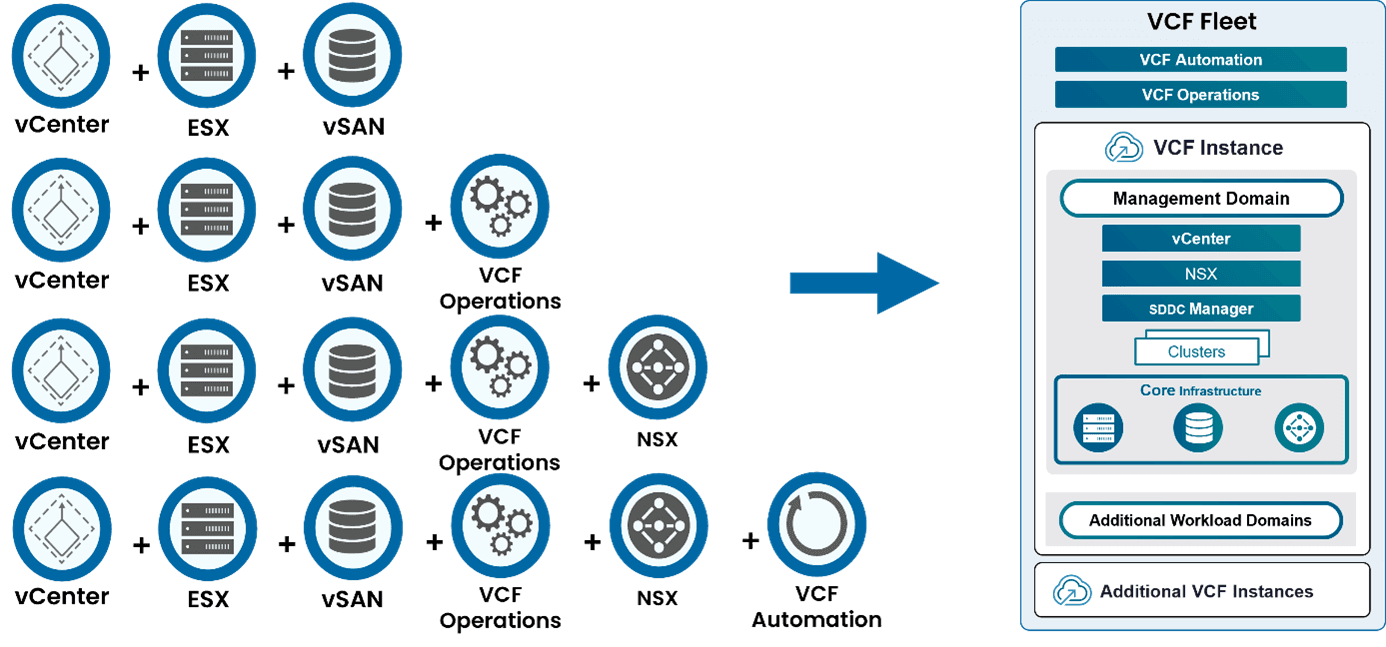
As you can see, there is nothing stopping you from upgrading towards VCF9. But how does an upgrade actually work?
We typically start with one or multiple design workshops where we define business requirements and define design decisions for all relevant components. For a typical customer running vSphere 8, the journey looks like this:
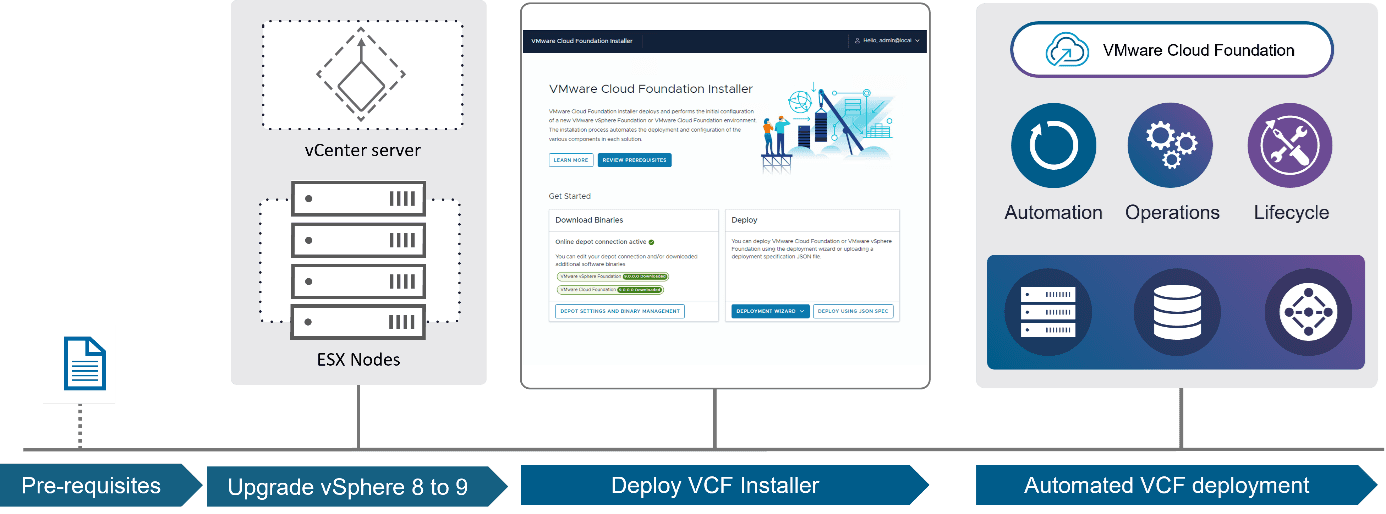
Identify the required services and gather the configuration parameters necessary for the VCF deployment workflow.
Upgrade the existing components that will be imported within the VCF deployment. In our example it's the vCenter server and ESXi nodes. This is the same procedure as upgrading from vSphere 7 to 8.
Deploy the VCF installer appliance and start the VCF deployment workflow.
Grab a coffee and wait until the fully automated deployment is completed.
Start utilizing your newly upgraded VCF Private Cloud Platform.
Why UNIT-D?
Did you know that we have the highest number of Belgian Broadcom VCF Knights at UNIT-D? Broadcom Knights are the pinnacle of certification within Broadcom for a specific domain.
Reach out to us if you would like to have a chat about VCF9 and the upgrade possibilities for your environment.